

A coordinator agent plans the work and starts three workers. In another project, two more agents are fixing a bug. Each one runs in its own terminal session. An hour later, the hard question is no longer what to ask them next. It is simpler: who is doing what, and who is waiting for me?
sitboard answers those two questions. It is a free, open-source command-line tool from IZZY. Run sitboard, and a live board of the Claude Code agents running on your machine opens in your browser. Nobody creates tasks in it, and the agents need no setup: it shows work that is already running.
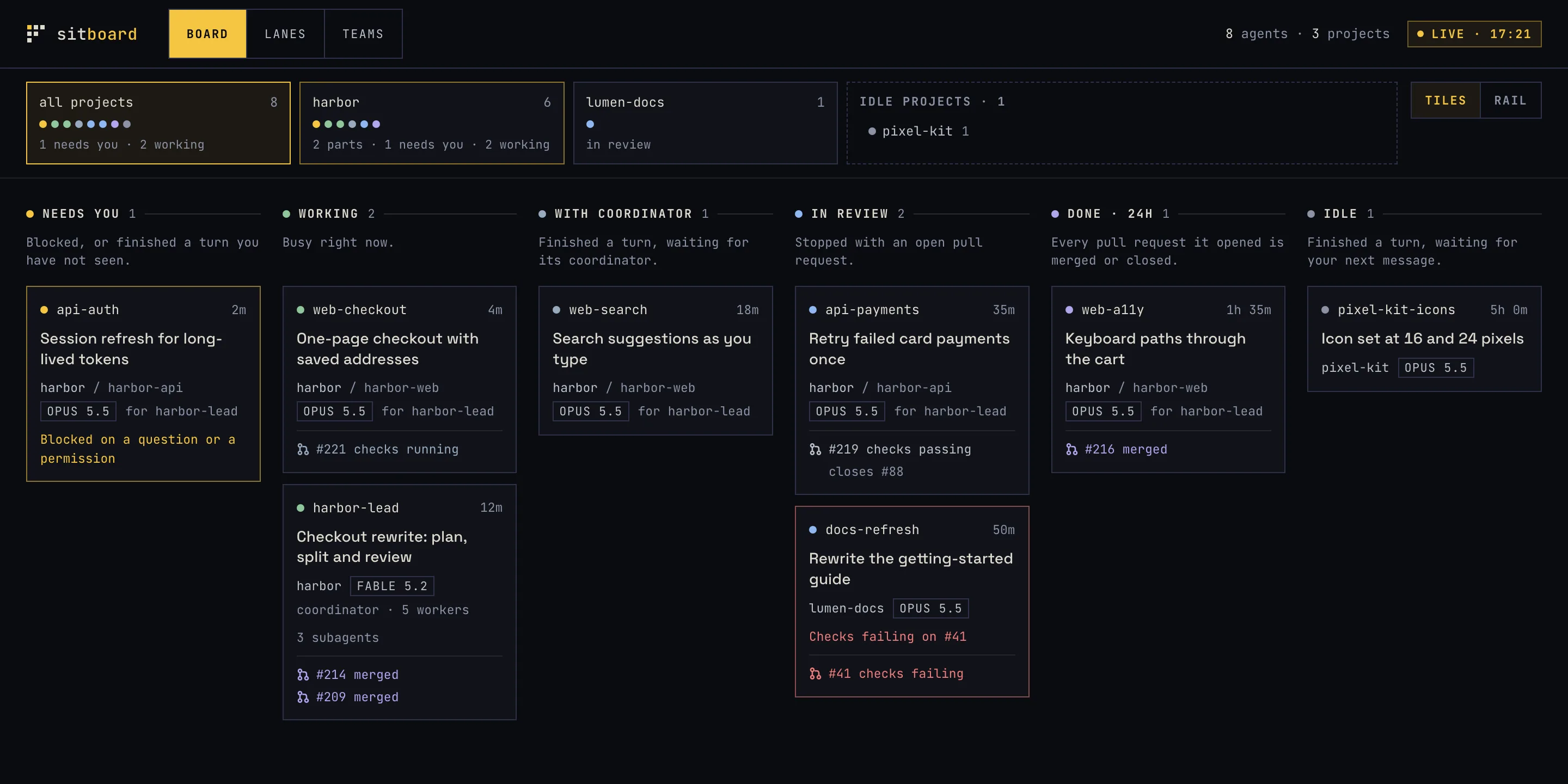
What the board shows
Every live agent session gets a card, and every card sits in one column, decided by what the agent is doing now:
- Needs you: the agent is blocked on a question or a permission, or, for an agent with no coordinator, it finished a turn you have not seen.
- Working: the agent is busy.
- With coordinator: a worker finished its turn and is waiting for the agent that started it.
- In review: the agent has stopped and one of its pull requests is still open. Failing checks are flagged on the card.
- Done: none of the agent’s pull requests is still open, and the last one closed in the last 24 hours.
- Idle: the agent finished, you have seen it, and it is waiting for your next message. Agents whose state cannot be read also land here, marked “status unknown”.
Every card shows how long it has been in its state, and cards move between columns as the agents change state. A card that stays busy with no activity for 20 minutes is flagged as stale; that is a hint, not an error, because a long build is quiet too.
The same cards can be read three ways:
- Board, the default: one column per state. Project tiles or a side rail choose which projects every view shows.
- Lanes: one row per project, with a “Needs you” strip on top.
- Teams: your queue of what needs you, beside one panel per coordinator with the workers it spawned, and one panel of solo agents.
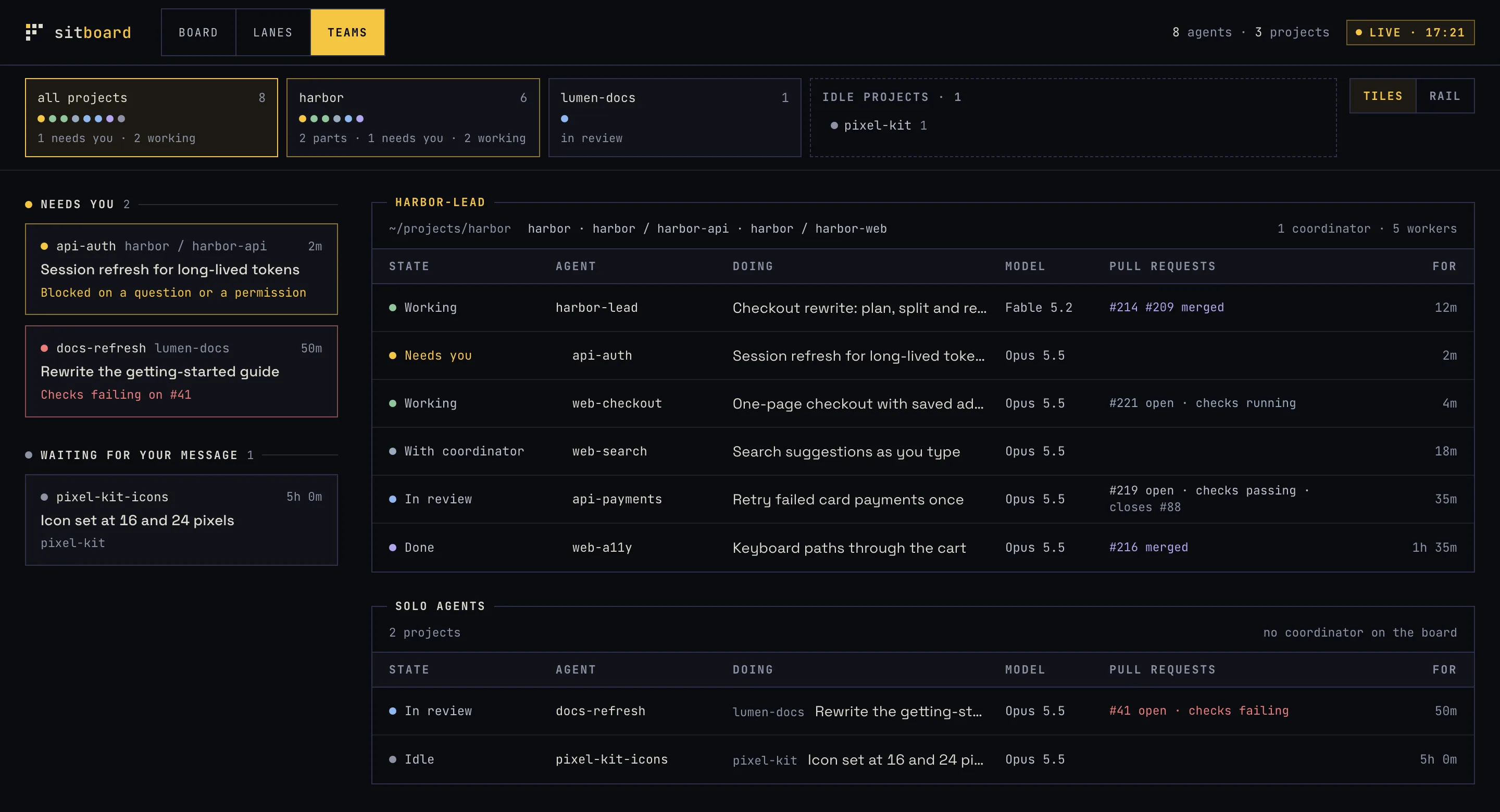
A card’s title is its open pull request’s title, else the session’s own title or name, else the folder name. Pull requests are linked to the agent that opened them. When sitboard cannot tell something, the card says so (“status unknown”, “model unknown”) instead of guessing.
Nothing to set up
sitboard finds the work by itself. It reads Claude Code’s own records of live sessions, runs git in each session’s folder to find the repository and branch, and, if you use GitHub, asks your own gh command for pull request state, checks and linked issues.
If you use the agterm terminal, clicking a card jumps to that session. agterm is optional: without it, clicking a card shows the session’s folder and name, ready to copy, so you can find it yourself.
Local, and never session text
A tool that can see every agent session has to be strict about what it does with them:
- The server listens on
127.0.0.1only. sitboard opens the board through a private link that is valid while that run is alive, and it checks every request, so another web page or site cannot read or drive it. - The page receives names, titles, folder paths, states, times, model names and pull request links. Prompt text, code and tool output are never shown and never served.
- There is no account, no telemetry and no update check.
- sitboard sends nothing anywhere itself. The only outbound traffic is the read-only pull request lookups made by your own
gh, and--no-githubturns them off.
What version 0.1.0 does not do
- It supports Claude Code only. Codex sessions are not supported yet.
- It shows agents and can focus a session. It does not start, stop, answer or manage them.
- macOS is where we test it. Linux builds are published but not tested by us, and there is no Windows build.
Install and run
brew install izzy-agency/tap/sitboard
sitboard
sitboard prints its private link for this run and opens the board in your browser. It needs Claude Code; gh, logged in, is optional and adds pull request state. The macOS builds, for Apple silicon and Intel, are signed with a Developer ID and notarized. Useful flags: --no-open to start without opening the browser, --no-github for no network traffic at all, --roots to limit which folders count, and --stale-after to change the 20-minute stale threshold.
The project site is sitboard.com, and the source is on GitHub under the MIT licence. It sits on our open-source page next to our other tools.
Why we built it
We built sitboard for our own work. On a busy day, several coding agents run in parallel across projects, often a coordinator with its workers in each one, and the useful signal is easy to miss: the one agent blocked on a permission, or the worker that finished an hour ago and is waiting for a review.
Knowing which agent is waiting, and for whom, is part of keeping a run under control, one of the layer groups in our agent harness framework.
Running several agents across a team?
If your team is moving from one coding assistant to several agents working in parallel, our AI Agents & LLM Products work covers the harness around them: what each agent may touch, how its work is reviewed and how you keep track of what it is doing.
Frequently asked questions
Yes. sitboard is open source under the MIT licence. There is no account and no paid tier.
No. The board runs on your machine and only ever receives names, titles, folder paths, states and links, never session text. The one outbound call is the read-only pull request lookup made by your own gh command, which --no-github switches off.
Not yet. Version 0.1.0 supports Claude Code only.
No. agterm adds the one-click jump to a session and better card titles. Everything else works in any terminal.
No. sitboard shows what your agents are doing and can focus a session in agterm. It does not start, stop or answer them.